

How to Create an OpenAI Conversion Key
Learn how to create a conversion key in your OpenAI account for Elevar's CAPI integration
Overview
Follow this guide to learn how to create an OpenAI Conversion Key for Elevar's CAPI integration.
How to Create an OpenAI Conversion Key
Access Conversion Key:
- Once you have logged into your OpenAI Ads Manager account, use the left-hand navigation menu to click on the "Tools" tab. An additional drop-down menu will appear, click on the "Conversions" tab.
- Once on the Conversions page, click on the "Conversion Key" button located at the upper right-hand corner of the page.
- (See Figure 1)
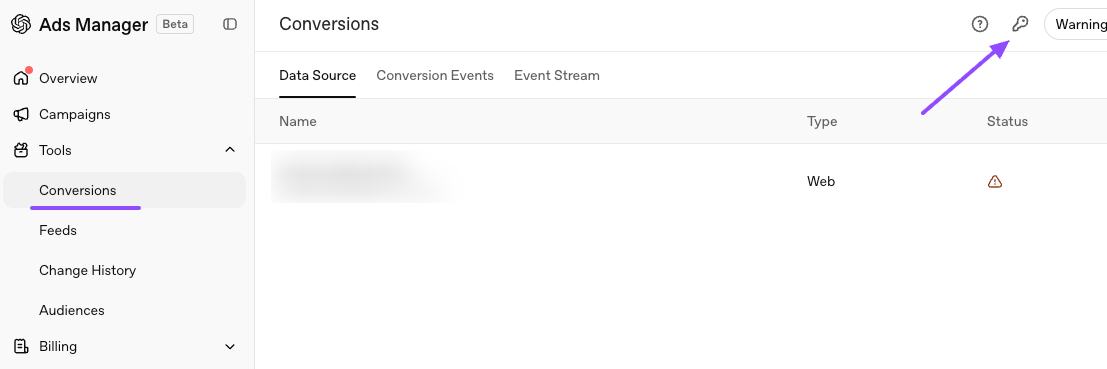
Figure 1
Create New Conversion Key:
- An additional window will appear titled "Conversion Keys". Click on the "Create new Key" button.
- (See Figure 2)
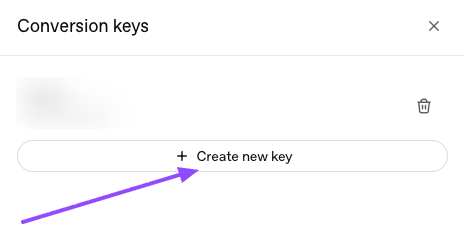
Figure 2
Confirm New Conversion Key:
- An additional pop-up window will appear titled "Create New Conversion Key".
- Navigate to the section of the window titled "Name" and use the text box to name the new conversion key.
- Once you have entered all of the required information for creating a new conversion key, click on the "Create" button located at the bottom right-hand corner of the window.
- (See Figure 3)
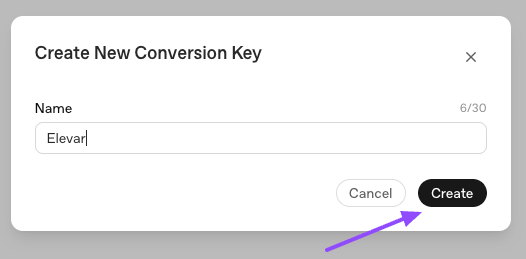
Figure 3
Updated about 1 hour ago
Did this page help you?