

How to Locate X (Twitter) Pixel ID
Overview
Follow this guide to learn how to locate your X (Twitter) Pixel ID.
How to Locate X (Twitter) Pixel ID
Access Events Manager:
-
Log into your X Ads Manager account.
-
Use the top navigation menu to click on the "Tools" button.
-
An additional drop-down menu will appear, click on the "Events manager" button.
- (See Figure 1)
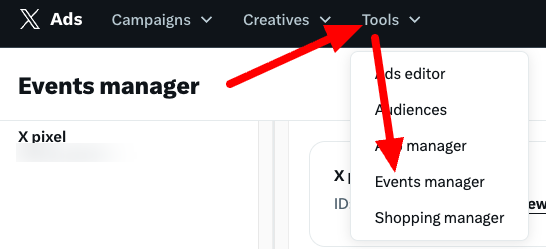
Figure 1\
Not seeing a Tools tab in your account?This is likely because a credit card hasn’t been added to your account. Find how to add one here.
(If Applicable) Generate New Event Source:
- You will be brought to a separate page. If prompted, generate your new Event Source.
- Click on the "Add event source" button and agree to the Terms of Service.
- (See Figure 2)
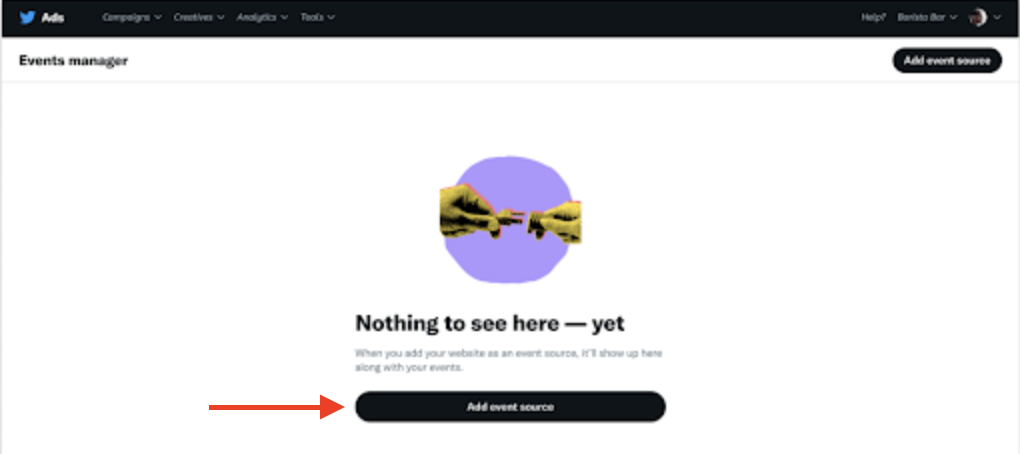
Figure 2
Locate your X Pixel ID:
-
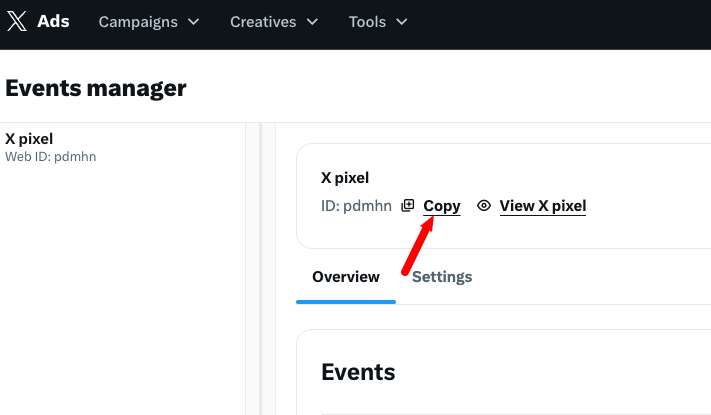
At the top of the page, you will find your X Pixel ID.
-
Example Pixel ID: pdmhn
- (See Figure 3)
-
_Figure 3_
Updated 7 months ago
Did this page help you?