

Elevar Events and Properties Sent to Omnisend
Overview
Read this guide to learn about the events and properties that Elevar sends to Omnisend! Within the Elevar app, you can select from the following events to send, allowing you to customize the data flow to your specific needs.
Elevar Events and Properties:
When setting up Omnisend as a server-side destination, several Elevar events are tracked. Below is a list of the events and their corresponding properties that are sent.
Within Omnisend, you will find the Elevar events under the "API" category.
- (See Figure 1)
| Event Name: | Properties: | Equivalent Omnisend Trigger |
|---|---|---|
| viewed product | abandonedCheckoutURL (if there is an item in cart), currency, lineItems Item info: productID, productImageURL, productPrice, productQuantity, productSKU, productTitle, productURL, productVariantID | Viewed product |
| added product to cart | abandonedCheckoutURL, currency, addedItems, lineItems Item info: productCategories, productID, productImageURL, productPrice, productQuantity, productSKU, productTitle, productURL, productVariantID | Added product to cart |
| started checkout | abandonedCheckoutURL, currency, lineItems Item info: productCategories, productID, productImageURL, productPrice, productQuantity, productSKU, productTitle, productURL, productVariantID | Started checkout |
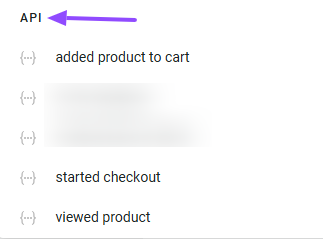
Figure 1
Updated 8 months ago