

Currency Mismatch Warning in Meta (Facebook) Conversion API (CAPI)
Overview
Meta has begun issuing warnings regarding currency mismatches between browser events and server-side Conversions API (CAPI) events. This warning is most commonly seen on stores using Shopify Markets, where customers can shop in a currency different from the store's base currency. This article explains what the warning means, why it occurs in Elevar's setup, and how to confirm that your data is not affected.
What Are CAPI Hits?
CAPI hits refer to conversion events sent directly to Meta using the Meta (Facebook) Conversions API. CAPI is a server-side tracking method that complements the Meta (Facebook) Pixel by sending customer interaction data from your server rather than the customer's browser. This makes it resilient to scenarios where traditional browser-based tracking may fail — such as when users have ad blockers enabled, cookies disabled, or experience browser-related data loss.
Why Is CAPI Important?
CAPI improves data reliability and completeness by creating a direct, server-to-Meta connection for key conversion events such as purchases, signups, and page views. This direct connection supports more accurate ad targeting, better campaign performance measurement, and ensures that businesses capture conversion data even when browser-based tracking is limited.
Why Does the Currency Mismatch Warning Occur?
This warning is primarily related to Shopify Markets, which allows customers to browse and purchase in their local (presentment) currency while the store processes orders in the store's base (shop) currency.
Each Meta ad account is configured with a single reporting currency. In a standard setup, the Shopify store currency and the Meta ad account currency are aligned — for example, both set to USD.
When a Shopify Markets order is placed in a different currency (e.g., CAD), the currency data takes two separate technical paths to reach Meta:
Server-Side Path (CAPI Event)
- A customer places an order in CAD (presentment currency).
- Shopify converts the order value to USD (shop currency) in the Shopify admin.
- The order creation webhook sends the order to Elevar in USD.
- Elevar forwards the event to Meta via CAPI in USD.
Browser-Side Path (Pixel Event)
- The same customer places an order in CAD (presentment currency).
- The browser fires the purchase event to Meta in CAD.
- Meta converts the CAD value to USD for reporting, since the ad account is set to USD.
These are two different technical paths that ultimately arrive at the same USD value for reporting. However, because the raw currency codes differ at the point of transmission (USD via CAPI, CAD via Pixel), Meta flags this as a mismatch.
What To Do If You See This Warning
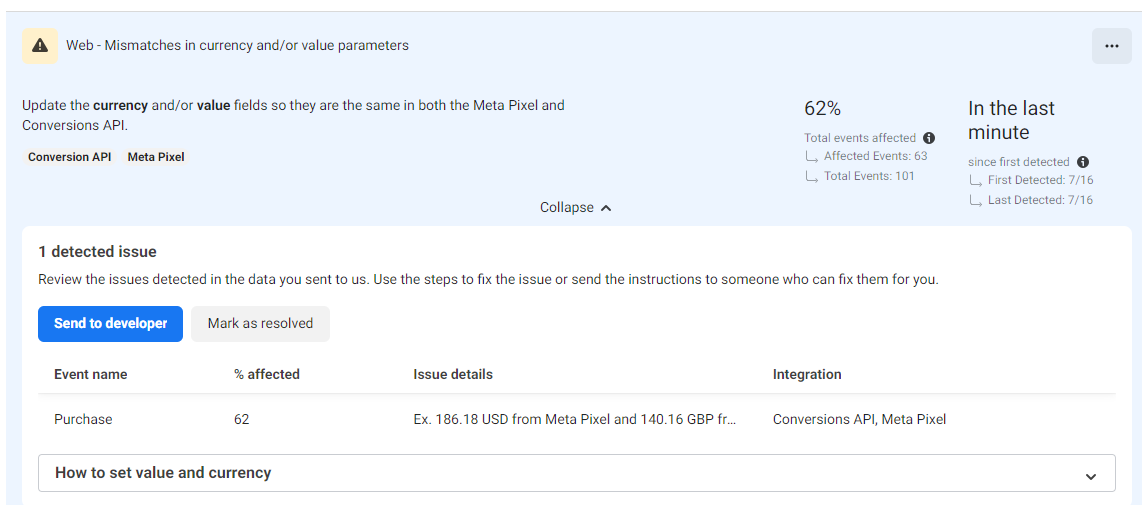
Don't Panic:
The Meta team has confirmed that this warning does not indicate a problem with Elevar's setup. Your ads and reporting will not be affected. The warning is designed to catch genuine inconsistencies — such as cases where a CAPI event is sending an incorrect value, or where a server event is incorrectly attempting to update the value of an existing Pixel event (which Meta does not support). In Elevar's case, neither of these issues applies.
Verify with De-duplication Rate:
The most reliable way to confirm that the currency mismatch warning is not impacting your data is to check your de-duplication rate for the Purchase event in Meta Events Manager.
How to check:
- Navigate to Meta Events Manager.
- Select your Pixel and open the Purchase event.
- Review the de-duplication rate metric.
What to look for:
A de-duplication rate at or near 100% confirms that Meta is correctly pairing the event_id and purchase signals from both the browser Pixel event and the CAPI server event. This indicates that the currency mismatch warning is a diagnostic artifact of the two-path currency conversion, not a sign of data loss or inaccuracy.
| De-duplication Rate | Interpretation |
|---|---|
| 99% or higher | ✅ Meta is successfully matching Pixel and CAPI events, there is no issue |
| Below 99% | ⚠️ Investigate potential event_id or signal mismatches |
Updated 5 months ago